
Garden Layouts for Build a Garden Tower
A floor plan that serves the loop, not just the screenshot.
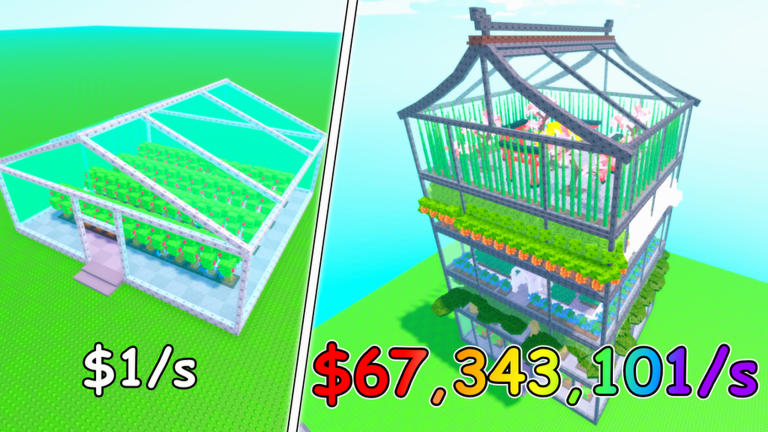
The greenhouse is not a blank canvas. It is a production grid with one constraint: you have to walk it. A beautiful floor that slows collection is a floor that fights your own rate. This page is the layout logic, not a decoration catalog.
The three-zone floor
Every floor should have three zones, even on day one:
| Zone | Job | What goes here |
|---|---|---|
| Income | Generate cash-per-second | Compact, fast-harvest crops from starter plants |
| Path | Let you walk and collect | Empty tiles, no benches, no tall models |
| Showcase | Photograph well, not earn well | Update 6 themed pieces, torii, cherry blossoms |
Official art shows all three zones on the Day 7 floor: dense trays, a clear walkway, and a decorative corner. That floor is a destination, not a day one plan.
Pathing rules that do not change
Straight line through the center. A path that curves around the edges looks nicer in a screenshot. A straight center path collects faster on every platform, especially mobile where jumping is imprecise.
One entrance, one exit. If you have to backtrack to reach the sell prompt, the layout is the problem. Keep the path continuous from plant area to sell point.
No dead ends. A plant at the end of a bench row hides its own prompt. If you cannot see the collect prompt from the path, the plant is too deep.
Auto Collect does not fix bad pathing. The pass ticks every two minutes and collects fruit. You still have to sell, forage, and check tooltips by hand. A floor with no walking lane means you are jumping through glass every time you interact with the game.
Plot density
The $1/s starter house in official art is packed. Every tile has a plant. There are no decorative gaps. Density is the lesson: more plants per floor is more cash-per-second per floor.
Fill the center first. The center is easiest to walk to and collect from. Edge plots are for showcase pieces that do not need frequent interaction.
Leave the corners for huge models. A pagoda piece in a corner does not block a path. A pagoda piece in the center blocks everything.
Stack producers, separate showcase. Compact income crops can share a grid. Each huge model needs breathing room so its prompt is readable.
Update 6 theme placement
The current Roblox icon (Update 6, 1 September 2026) shows: pagoda roof, cherry blossoms, red torii, orange tulip rails, indoor koi pond.
These are showcase. Put them where they do not interfere with collection:
- Cherry blossoms: top floor edges, away from the path
- Torii: corners or as a floor entrance marker, not center
- Tulip rails: balcony edges, not walking lanes
- Koi pond: one per floor, near the path entrance for the visual without blocking collection
- Pagoda roof: literal top of the tower, not a functional floor
Theme pieces earn the same as any other plant with the same tooltip. They do not earn extra because they are themed. After a numbered update, loot tables often skew toward the new set — Update 6 has the current theme filter.
Mobile layout specifics
Mobile players should play in landscape. Portrait mode hides the storage bar and makes the shop feel like a wall of icons.
On mobile:
- Keep plants smaller and grid-aligned
- Avoid tall models that extend above the viewport
- Put the sell prompt near the path entrance so you hit it without scrolling
- Test the layout on your device before filling the floor with showcase
When to reorganize
Reorganize when:
- A new floor drops and you have two floors of mixed showcase and income
- Forage finds are sitting in the bag because no plot fits them
- You bought +200 Storage and still overflow after selling
- A patch changes the theme and you want to refresh
Do not reorganize when:
- The HUD rate is climbing every session (if it is not broken, do not fix it)
- You are mid-session with a full bar (sell first, reorganize after)
- You just bought a new floor but cannot plant it today (plant first, reorganize later)
Layout checklist before a new floor
- Every current plot has an income plant (not a bench)
- One clear walking path from plants to sell prompt
- No tall model blocking the center of the floor
- Storage is under two-thirds so the new floor has room to breathe
- Cash covers the upgrade and one restock
- You can plant the new plots before logging off
If all six are true, buy the floor. If not, go back to tower upgrades and make money until they are.
The pagoda is a destination
The four-storey pagoda in official art is the end state. It took real time and real cash to reach. Do not try to look like it on day two. Look like the $1/s starter house — packed, functional, earning — and the pagoda will happen on its own.
Layout serves production. Production funds height. Height lets you theme. That is the order.
Frequently Asked Questions
Quick answers to the most common questions.
Should I copy the Day 7 courtyard layout from official art?
Only after your HUD rate supports it. The courtyard is a reward for a full, earning tower, not a blueprint for day one.
How do I layout for mobile?
Play in landscape, keep plants small and grid-aligned, put the sell prompt near the path entrance, and avoid tall models that block the viewport.
Can I mix income and showcase plants on the same floor?
Yes, but separate them: income in the center for easy collection, showcase on edges and corners where they do not block prompts.
When should I reorganize my floors?
When you get a new floor and have mixed layouts, when forage finds have no home, or when a patch changes the theme. Not when the rate is climbing.